
A useful B2B FAQ helps a buyer resolve a specific uncertainty and reach the right next step. Build it from real questions, give each answer a clear home, and keep decision-critical information on the product or service page where people need it. The deliverable is an answer system: a question log, a placement map, approved answers and a release check.
This guide is for marketing and website teams deciding what their FAQ should contain and how to maintain it. Use it alongside the service-page guide and product-page guide, which cover the main content of those pages.
Start with the uncertainty that blocks a decision
“What do we want to say?” produces a second company brochure. “What does the buyer need to decide?” produces a useful question. Collect the language used in sales conversations, support requests, site-search terms and research sessions. Remove personal and confidential details before moving observations into an editorial log. A question proposed by the team can be worth answering, but label its origin as a hypothesis until you have observed it.
Record the question, the decision it affects, the product or service involved, the evidence needed, and a person who can verify the answer. Frequency is useful context, not the only priority: an uncommon compatibility question may prevent a serious specification mistake. Avoid an arbitrary target number of FAQs. Stop when the relevant decisions are answered without repeating the page.
Choose an answer location before writing
Use these placement rules as an editorial decision aid:
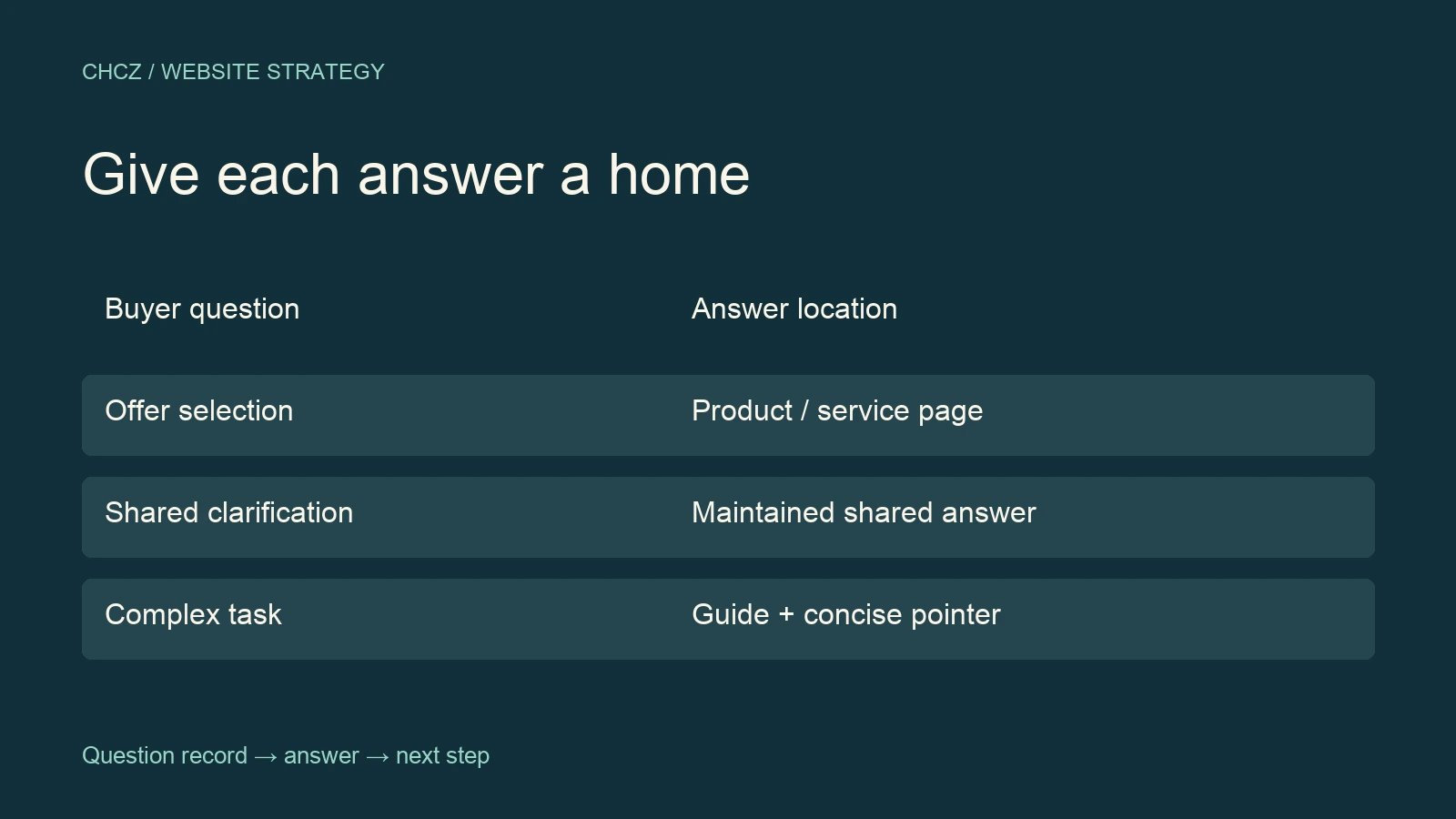
- Essential to evaluating one offer: put the answer in that product or service page’s main content. An FAQ can link to the detail.
- A recurring clarification about that offer: use a short local FAQ below the relevant section.
- Shared across several offers: give the answer a maintained shared page, and link to it from affected pages. A central FAQ can be an index into those answers.
- A complex task requiring steps or detailed evidence: create or reuse a guide, then provide a short answer and contextual link.
- Specific to one order, account or confidential design: route the buyer to an appropriate private conversation.
A central FAQ is justified when buyers need to compare answers across the business. It should not become a storage room for information removed from useful pages. If people repeatedly ask where to find a specification, repair the product page or navigation as well as answering the question. The navigation guide covers destination labels and paths.
Use a question record that exposes missing evidence
Copy this record into your content workflow. Leave an unanswered field visible rather than letting a writer invent a plausible answer.
- Question in buyer language: the actual wording or an explicitly labelled research hypothesis.
- Decision: what the buyer can decide after reading.
- Scope: which offer, model, region or version the answer covers.
- Verified answer source: current specification, approved process or responsible subject expert.
- Answer owner: person or role responsible for correctness.
- Public answer location: existing URL and section; proposed new location only if necessary.
- Next step: destination for the unresolved task, with the information the buyer should prepare.
- Review trigger: the product, process or document change that would invalidate the answer.
For conflicting sources, pause that answer and resolve the discrepancy with its owner. A newer document may cover a different model rather than replace the old one. Keep the source and scope together. Questions involving terms, warranties, commercial commitments or personal data need the appropriate internal approval before release.
Write a direct answer with a useful boundary
Use four parts: answer the question immediately; explain the condition that changes the answer; link to the supporting detail; describe the next step if the condition is unknown. Keep the answer as short as the decision allows. A technical limitation may need more explanation than an office-contact question.
Replace “Contact us for more information” with a specific onward task. For example, ask the reader to identify a model and operating condition when those are needed to check compatibility. Only promise a response time if the business has approved and can support that commitment. The FAQ should describe the existing process accurately.
Use question wording that stands alone. “What about integration?” is unclear outside its page. “Which system versions does this connector support?” identifies the decision. Write the verified version range in the answer and link to its maintained source. Avoid putting unverified ranges into a reusable template.
Work through a hypothetical manufacturer example
Consider a fictional equipment manufacturer whose team proposes “Can this pump handle my fluid?” for a central FAQ. The question is important, but a blanket yes would hide the conditions needed to make the decision.
- Define the decision: the buyer needs to decide whether a specific model is a candidate for technical review.
- Gather evidence: the relevant model’s material specification and approved operating limits, plus the buyer’s application details.
- Place the answer: publish model-specific limits on the product page; use a local FAQ to explain how to request an application check. A central FAQ can link to that process.
- Draft safely: “Compatibility depends on the selected model and application conditions. Check the model’s current material and operating specifications. If your application is outside the published information, send the model reference and application details for review.” This is illustrative wording to adapt and approve, not a statement of a real supplier’s capability.
- Define a review trigger: a material change, revised specification or changed application-review process requires the owner to check the answer and its links.
The useful outcome is a connected path from question to specification to technical discussion. The FAQ does not replace the specification or establish suitability on its own.
Make the interface easy to read and operate
Start with visible questions and answers when the set is short. For a longer set, group questions by buyer task and use descriptive headings with jump links. Avoid categories that only make sense inside the company. Test whether a new visitor can predict which group contains their question.
If you use an accordion, follow the W3C accordion pattern: headings contain button controls, expanded state is exposed, and controls identify their panels. Enter or Space operates the focused header; Tab and Shift+Tab move through focusable controls and content. Verify those behaviours in the actual component. This interaction check is part of accessibility testing, not a substitute for it.
Test a direct link to a question, a narrow mobile viewport and the path back to the offer. If a closed panel contains the linked destination, make sure the user can reveal and read it. Keep answer text available to the page rather than loading it only after an unrelated interaction.
Separate helpful answers from search presentation
Use a descriptive page title, clear question headings and crawlable links to supporting pages. Do not make FAQ rich results the reason for building the content. Google’s current documentation changelog records that the FAQ rich result stopped appearing on May 7, 2026, and that its documentation was subsequently removed. Older implementation articles may describe an availability rule that no longer applies.
Evaluate whether the reader can find and use the answer. Search visibility and AI citations require their own observations; publishing a question format does not establish either outcome. Keep one maintained answer location and link to it rather than making near-identical pages for every phrasing variation.
Accept the FAQ as a complete buyer task
Choose a representative question and ask a participant to find its answer from an ordinary product or service entry page. Do not tell them the FAQ location. Observe the route, the interpretation of the answer and the next action. Use the usability-testing guide to plan and record the session.
- The question is discoverable from the relevant offer and uses recognisable language.
- The answer identifies its scope and agrees with its maintained source.
- Essential selection information remains visible on the offer page.
- Supporting and onward links open the intended destination.
- Mobile text, links and expanded panels remain readable without page-level overflow.
- Keyboard focus is visible and interactive controls work.
- An answer owner and review trigger are recorded internally.
Record observed failures and retest after the change. A click on an FAQ shows an interaction; it does not show that the buyer understood the answer. Where possible, pair behavioural observations with the user’s explanation of what they would do next. Keep analytics interactions, search performance and qualified inquiries separate.
Maintain and retire answers deliberately
Review affected answers when an offer, specification or process changes. Update the authoritative detail first, then check local summaries and links. If a question disappears because the main page now answers it clearly, retire the redundant FAQ while preserving any useful link destination. If an answer becomes too complex to maintain in a small panel, move the detail into its own useful guide and retain a concise pointer.
Use the website governance framework for standing responsibilities. For the broader planning context, return to B2B Website Strategy. To discuss an unclear buyer path, contact CHCZ with the page URL and the question visitors are trying to resolve.