
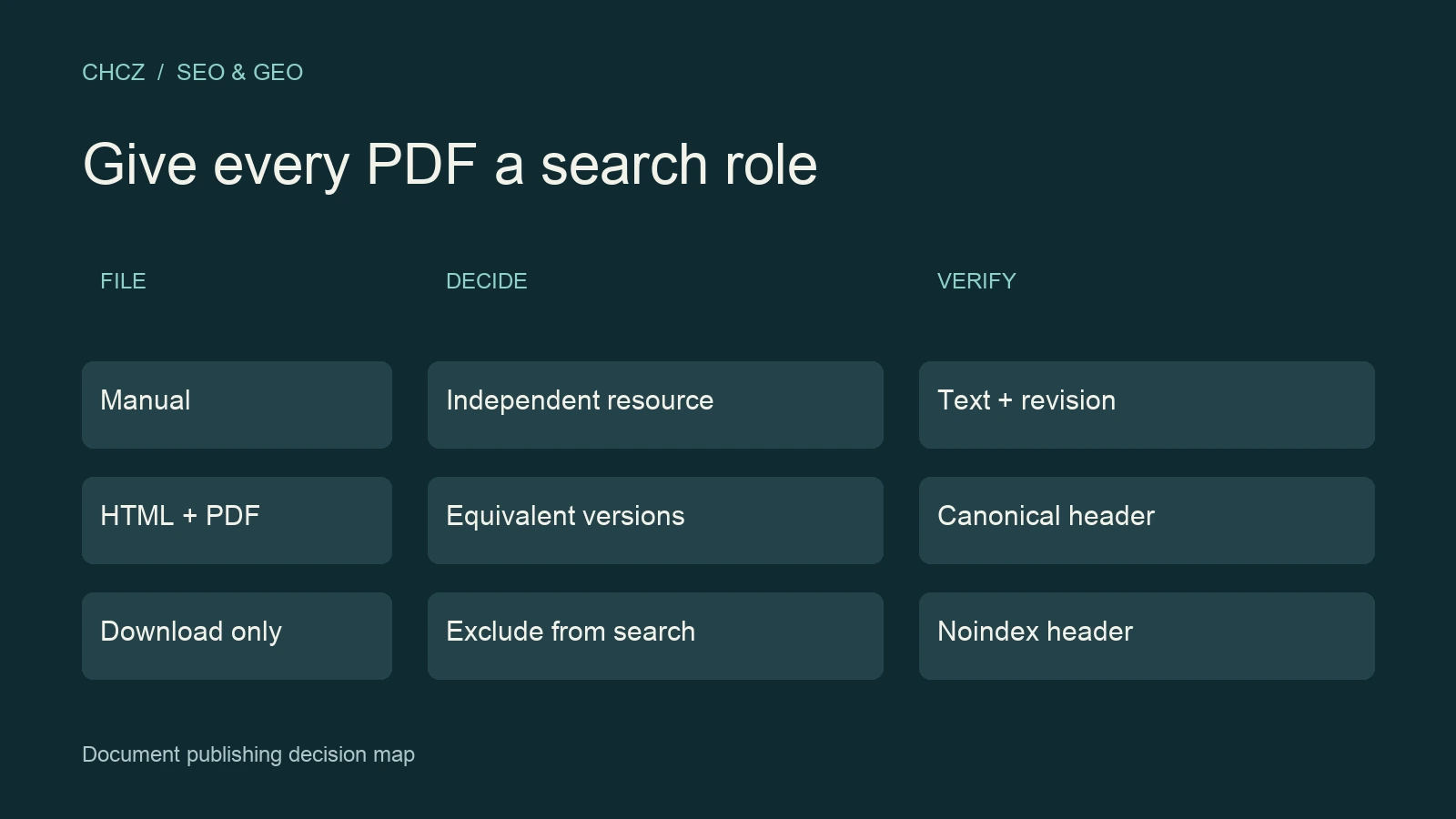
PDF SEO starts with a publishing decision: should the file itself answer a search query, should an HTML page own that answer, or should the document stay out of public search? For B2B datasheets, catalogs and technical guides, settle that question before editing filenames or compressing files.
This guide helps marketing teams, document owners and developers publish technical PDFs with a clear search role. Use the release record below to connect document identity, indexability, the corresponding HTML page and the actual file delivered to a buyer.
Choose the PDF’s search role before optimizing it
Start with the buyer’s question. A person looking for a named installation manual may want the file directly. Someone comparing applications or choosing a product family may need an HTML explanation, related specifications and a clear next step. The format should support that task.
Assign one of these roles to each document:
- Independent search resource: the PDF contains a useful, distinct answer, such as a complete public technical manual. Keep its identity and applicable products clear.
- Download beside an HTML answer: the page explains selection or use, while the file provides a portable reference. Decide whether their content is actually equivalent before considering canonicalization.
- Public download excluded from search: people can retrieve the document through an appropriate page, but it is not intended as a search landing destination.
- Restricted document: access depends on authorization. Have the responsible team implement access controls; search exclusion alone does not provide confidentiality.
A short download landing page and a detailed manual are not automatically duplicates. Avoid pointing every PDF canonical at a product page simply because the product page is commercially important. First compare the actual content and user purpose. Our B2B product-page guide covers the separate task of connecting specifications and downloads to the correct model.
Prepare readable text and an identifiable PDF
Google can index PDF text. Its PDF indexing guidance describes copying text into a plain-text document as a useful check and identifies document-title metadata and incoming link text as title signals. Treat this as a practical starting check, rather than proof of indexing.
Open the exported file and copy a representative passage, including a model code and a unit. Check whether the extracted characters retain their meaning. If the source was scanned, review the OCR output: a searchable layer containing an incorrect part number still gives the reader the wrong information.
Use a descriptive filename and a document-specific title. Review headings, reading sequence, language, link labels and table relationships in the exported file. Digital.gov’s PDF preparation guidance provides a useful metadata and searchable-text checklist. Its Search.gov ranking details are specific to that service.
Put document identity where a buyer can see it: document name, identifier, revision, language and applicability. Metadata hidden in file properties cannot resolve a visible conflict between an old cover and a new filename. Check the final export against the approved source, including diagrams and annotations.
Optimize file size while retaining usable technical detail. Inspect dimension labels and drawings after compression. Test the actual file on a small screen and when downloaded; use the accessibility checklist to plan the wider buyer journey, and include document-specific accessibility review in the assignment.
Check the PDF response, not only the surrounding page
An HTML page’s SEO settings do not establish the response headers served by a linked PDF. A developer should inspect the final file URL, including any redirects and CDN delivery, and record the headers returned to an ordinary request.
For duplicate or very similar content, Google supports a canonical HTTP Link header for non-HTML documents. The following illustrative response points an equivalent PDF version toward its HTML owner:
Link: <https://example.com/resources/installation-guide/>; rel="canonical"The target must genuinely represent the corresponding content. Canonicalization is a preference signal; record what Google eventually selects separately from what the server declares.
For a publicly accessible PDF that should be excluded from search, Google documents the X-Robots-Tag response header:
X-Robots-Tag: noindexCrawlers need access to read the instruction. Blocking the same URL in robots.txt can prevent that. Noindex and canonicalization solve different problems: choose search exclusion for a document that should not appear, and assess canonicalization when consolidating equivalent versions. Review existing directives before adding a new one.
Ask for a narrowly scoped change and retain the previous configuration. Test a neighboring file that should remain indexable as well as the target. A rule intended for one obsolete download should not silently exclude the whole media library. These examples describe a review task; implementation depends on the actual host and file-delivery setup.
Copy the PDF SEO release record
Create one record per public file URL. Keep observations separate from the intended policy, and attach the exported file or its controlled reference so another reviewer can reproduce the check.
- Identity: file URL, document ID, title, revision, language and applicable models.
- Buyer task: the question answered, intended audience and owning HTML page if applicable.
- Search decision: independent resource, equivalent alternate, excluded download or restricted material; include the reason.
- Observed delivery: check date, final URL, HTTP status, Content-Type, redirects, Link and X-Robots-Tag headers.
- Document acceptance: readable text, correct model codes and units, title metadata, visible revision, working links and document accessibility findings.
- Ownership: technical reviewer, editorial reviewer, release reference, unresolved issue and next review trigger.
- Follow-up: discovery/indexing observation, search performance scope and independently measured download or inquiry evidence.
If a header, index status or business result has not been checked, record Unknown. A successfully downloaded file proves delivery in that test; it does not establish search visibility or lead quality.
Worked example: a fictional installation guide
Imagine a fictional manufacturer publishing a pump installation guide. A product page summarizes fit, an HTML guide explains installation, and a PDF reproduces that guide for use away from the website. An earlier revision remains linked from an old resource page.
First, the document owner confirms the current revision and whether users still need the earlier instructions for an older model. The editor compares the full HTML guide with the PDF. If they are equivalent, the team can assess a canonical header toward the HTML guide; the short product summary is not the equivalent target.
If the older document is still required, label its applicability and make the current route clear. If it should remain downloadable but not appear in search, review a file-specific noindex instruction. If it is replaced entirely, assess the replacement and URL treatment through the migration checklist. Do not redirect every retired manual to an unrelated homepage.
Acceptance requires opening the actual public download, matching its revision, checking its response and following the links back to the relevant page. Record those observations before closing the task. The example defines a workflow; the policy still depends on the real documents and their users.
Verify discovery, access and outcomes separately
Link to the intended resource with a label that identifies the document and format. Check that the download works through the public interface, and that any HTML summary explains what the file contains. The site-search UX guide helps test whether document queries reach the right destination.
After release, inspect search discovery and the selected canonical where available. Compare the actual reporting periods and query/page scope before evaluating performance. Keep a download interaction, a search click and an accepted inquiry as separate observations; none identifies the others by itself.
Add the document to the content audit inventory. Trigger a new review when its technical source, revision, language or public route changes. This keeps a useful file connected to its current web context.
Common PDF SEO questions
Can a PDF rank in Google?
Yes, PDFs can appear in Google Search. Readable content, accessible delivery and clear identity are useful foundations. An indexable response does not promise indexing or a particular position.
Should every PDF have an HTML landing page?
Choose an HTML page when readers need context, navigation or an onward action. A directly useful manual can also have its own search role. A thin summary is not automatically an equivalent canonical for the complete file.
Does setting noindex on a WordPress attachment page exclude the PDF?
Check the file itself. The attachment page and PDF are separate URLs; record the PDF response headers and access conditions instead of assuming that settings on one apply to the other.
Explore the SEO/GEO Authority cluster for related search controls. To discuss a document-publishing problem, share the public file URL, its intended search role and the HTML page it supports.