
A buyer types a part number into your website. A product appears, but the drawing belongs to another revision. The search worked as software; the buying task still failed. B2B site search UX should be reviewed against the destination a buyer needs, including the correct model, specification and document version.
Site search is the search inside your own website. For a technical catalog or resource library, review the whole route: query, suggestions, results, destination and next action. This guide provides a query acceptance record for a website team to use before release and after catalog changes.
Decide whether search is the missing route
Start with the buyer’s task. A small service website may need clearer navigation and better page labels before it needs a new search tool. A catalog containing models, product families and technical files needs a way to connect the words buyers know to the records the business maintains. Search can support that connection when browsing alone is cumbersome.
Write down what should be searchable: current products, approved technical files, application guidance and support content. Also identify material that should stay outside public search. Check the search index and downloadable destinations against the site’s existing access rules. Removing an item from results does not remove access to its public URL.
Use the B2B navigation task map for category names and browse routes. Use this record when the buyer already has a term and needs a reliable matching destination. Keep both routes available.
Build a query set from buyer language
Collect approved terminology from product records, support questions and appropriately handled search logs. Keep the exact string alongside its intended meaning. A salesperson’s internal abbreviation may differ from a buyer’s wording; a PDF may use a model name that differs from the current product title.
Baymard’s search research distinguishes query types such as exact, product-type, feature and non-product searches. For a B2B catalog, turn those distinctions into a practical test set. Include a model identifier, a product family, a material or dimension, an application description and a request for a technical document. This adaptation needs validation with your own catalog and buyers.
- Known item: a valid model code, with the spacing or punctuation buyers actually use.
- Product type: the common name of a family rather than an internal department name.
- Specification: a material, size or other documented property with its unit.
- Document: a model plus “drawing,” “datasheet” or the relevant document term.
- Recovery: a misspelling, obsolete identifier or unsupported requirement that needs a clear response.
For every string, identify an expected page or an acceptable set of pages before testing. Otherwise a reviewer can mistake any plausible result for a correct result. If the catalog itself cannot establish the answer, assign the content question to its owner before tuning relevance.
Copy the query acceptance record
Create one record per query. Keep failed and successful records together so a later relevance change can be checked against both. The following fields can be copied into a spreadsheet or issue tracker.
- Query and task: exact entered text, language and what the buyer needs to decide.
- Expected destination: approved product or document URL, identifier and applicable revision.
- Test context: date, catalog/search configuration version, viewport and active result filters.
- Observed route: suggestions shown, first relevant result, actual destination URL and visible evidence.
- Outcome: correct destination reached, wrong destination reached, or unresolved; include the reason.
- Fix and owner: content mapping, retrieval, ranking, interface or document lifecycle; assign a named role.
- Retest: repeated query, result, evidence link and reviewer decision after the change.
Do not use result count alone as a pass condition. A query returning many similar files may still lead to the wrong specification. Record what makes the selected result suitable for the task, including any visible limitation the buyer must understand.
Worked example: a fictional enclosure catalog
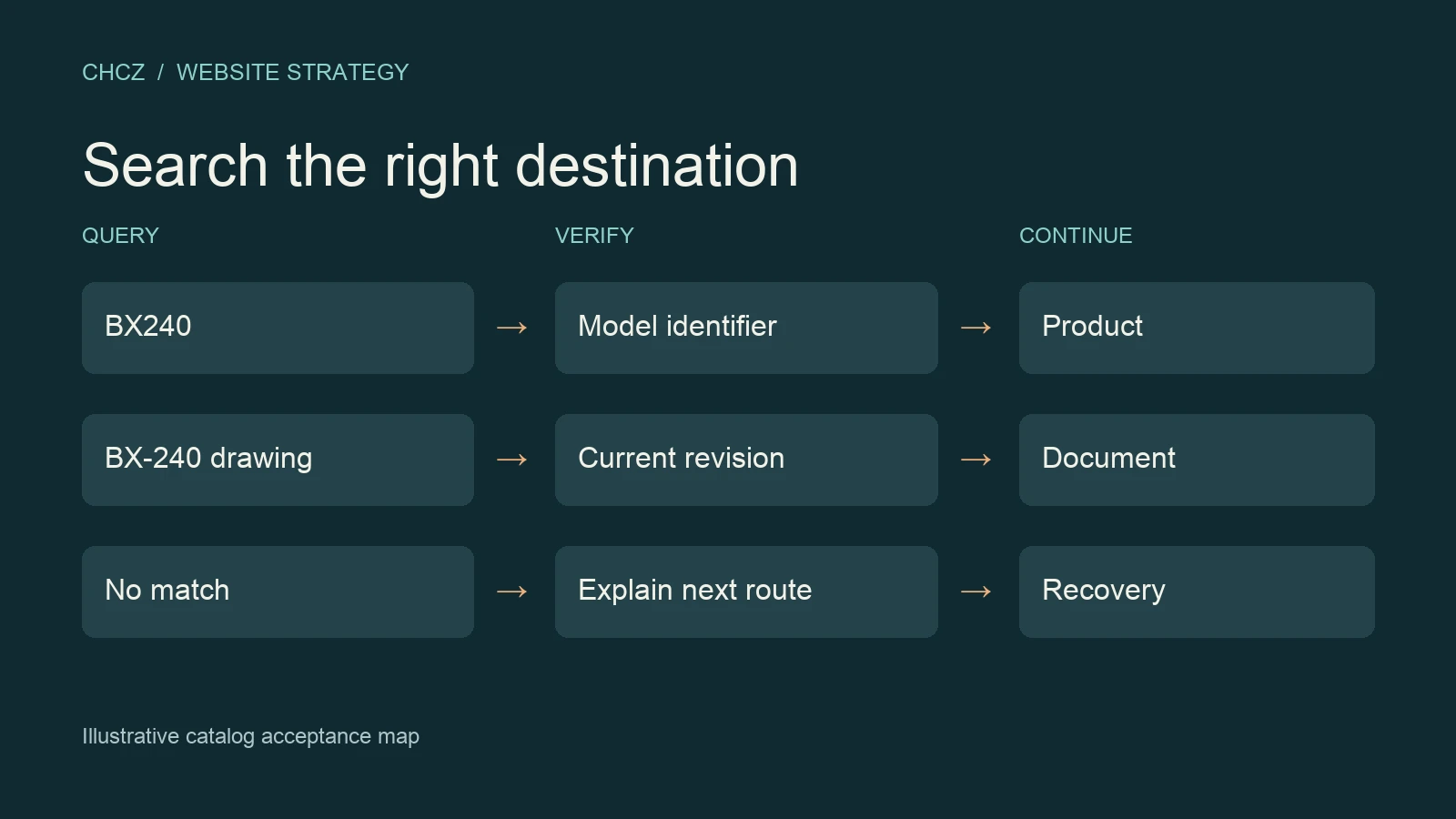
Consider a fictional catalog with model BX-240, an approved product page and a current drawing. These are planning examples, not observed test outcomes. Replace the identifiers and URLs with approved records from your own catalog.
“BX240”: match the identifier
The buyer omits the hyphen. The acceptance condition is a route to BX-240 with its full identifier visible. Confirm the normalization rule does not merge a different model that happens to share the same characters. If a neighboring model ranks above it, inspect identifier mapping and ranking separately.
“BX-240 drawing”: reach the correct file
The expected result is the approved drawing or a product page that clearly links to it. Show document type, model and revision where the catalog maintains them. An old file with an exact title match should not silently substitute for the current document. Establish how superseded files are labeled, removed from public search or routed to current guidance.
“steel enclosure 240 mm”: preserve the constraint
First establish what “240 mm” describes in the product data. It could be width, height or another dimension. Present enough labeled information to compare the results, or ask for clarification. Do not treat a matching number somewhere in a PDF as proof that the product meets the requested specification.
An unknown or superseded code: explain the next route
If no approved match exists, retain the query and explain what can be searched instead. Offer a relevant category or a contact route with the unresolved identifier available for the buyer to include. A replacement model requires an approved mapping; a similar name alone cannot establish interchangeability.
Review suggestions, results and recovery separately
NN/g recommends suggestions that lead to relevant results, with styling that distinguishes entered text from suggested text. For a catalog, label whether a suggestion is a product, a category or a document. Keep the submitted-query path usable when the suggestion list has no appropriate option.
On the result page, preserve the query and show meaningful titles. Product results need identifiers and useful distinguishing properties. Document results need context: what the file covers and which product it belongs to. Separate different content types when a mixed list makes the intended destination hard to identify. Avoid promising attributes that the underlying record does not contain.
Test zero results, irrelevant results and technical errors as different states. Zero results should help the buyer edit the query or browse a relevant family. A service error should communicate that search is unavailable and provide another route. Neither state establishes that the business cannot supply the requested product.
Keep result filters understandable, including how to clear them. Decisions about which filtered URLs should be search-engine entry pages belong in the faceted navigation SEO guide; they are separate from whether a buyer can use the results.
Check keyboard and mobile behavior on the actual interface
Use the keyboard to reach the input, enter a query, inspect suggestions, select a result and return to editing. For a combobox implementation, review the W3C APG combobox pattern when specifying focus, popup state and selection behavior. Agree the intended behavior before judging a custom widget.
At a narrow mobile viewport, check that the keyboard does not make the submission route inaccessible, long model codes remain readable, suggestions do not obscure essential controls and the result filters can be opened and cleared. Follow a result through to its PDF or product page. A usable results list does not establish that the destination works on a phone. Use the accessibility checklist for the broader buyer journey.
Fix the right layer, then retest the same queries
Classify the failure before selecting a tool. Missing product names or revisions need content work. An approved synonym that retrieves nothing needs retrieval investigation. A correct destination buried beneath irrelevant items needs relevance review. A result that cannot be selected needs interface work. A superseded drawing presented as current needs document ownership and lifecycle rules.
Change the responsible layer and repeat the failed query in the recorded context. Also repeat neighboring known-item and document queries: a synonym or ranking adjustment can help one query while making another less precise. Keep before-and-after evidence, and distinguish a team’s acceptance check from a study with representative buyers. The usability testing guide covers that wider research process.
Measure search use and buyer outcomes independently
GA4 defines the recommended search event with a search_term parameter. Check your existing instrumentation before adding an event so the same action is not counted twice. Decide how to handle sensitive or identifying text before sending query data to analytics.
Review query use, result selection and repeated reformulation alongside the acceptance records. Frequent refinement can indicate difficulty, but it can also be deliberate exploration. Confirm the explanation by reviewing the route. A search event is not evidence of a correct specification, a submitted inquiry or a qualified opportunity; each needs its own record.
Start with a known-item query and a document query. Resolve their expected destinations, test the full route and assign the first observed failure. Extend the query set as catalog changes and buyer questions reveal new requirements.
Continue with the B2B Website Strategy collection. To discuss a search route, share the page, query and intended destination with CHCZ.