
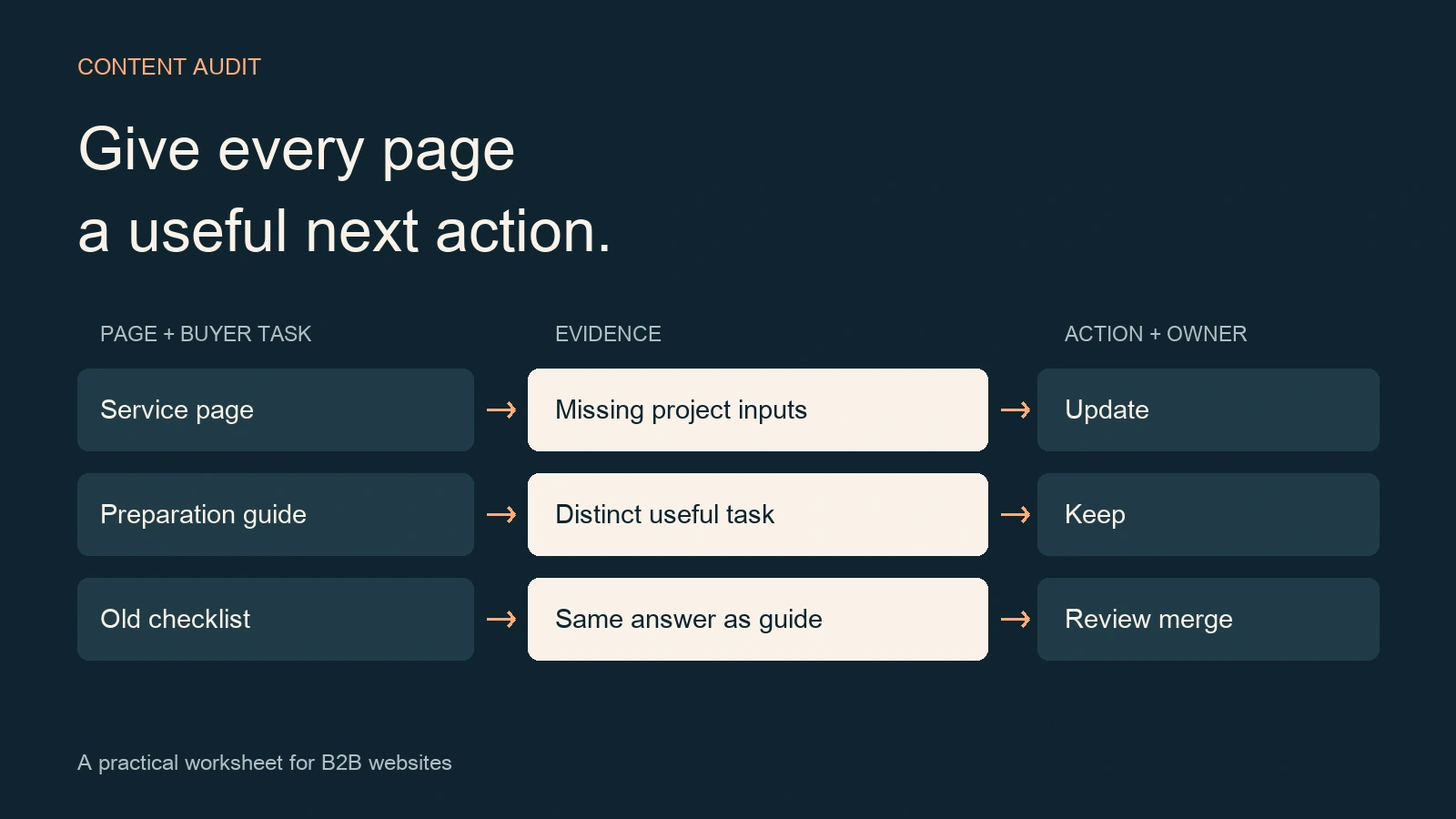
A website content audit template helps a B2B team turn its page inventory into a practical editing plan. Record what each page helps a buyer do, the evidence available, the specific content problem, and a proposed action. Then add an accountable owner, approval and an acceptance check so the decision can move into production.
Use this guide when your site has accumulated service pages, guides and old articles, and the next decision is what to keep, update or consolidate. The downloadable workbook includes a blank working area, a field guide and three fictional inspection-service examples. You can use it in Excel or import it into Google Sheets.
Download the editable website content audit template (.zip, contains .xlsx). Start with a copy and replace the example rows. The workbook contains no macros or automatic website actions.
In this guide: inventory versus audit · scope · template fields · evidence · decisions · worked example · handoff · questions.
What is the difference between a content inventory and a content audit?
A content inventory lists the pages and assets you have. A content audit evaluates whether those assets still serve their purpose and what should happen next. Nielsen Norman Group explains this distinction and recommends combining the inventory with a review of content quality and user needs.
A crawler export can help populate addresses, titles and response codes. A reviewer must still read the answer, check relevant facts and decide whether a buyer can use it. For an industrial service page, that might mean checking whether the required project inputs are clear. For a preparation guide, it might mean checking whether its instructions remain current.
This template handles that editorial review and its handoff. If you need to diagnose crawling, indexing, technical delivery and the entire search journey, use the broader B2B SEO audit checklist. Keep the content worksheet focused on the answer and the action.
Start with one buyer journey and a manageable page set
Write the decision before collecting data: “Which pages should support a buyer evaluating our inspection service?” is useful. “Audit everything” leaves the team without a stopping point. Choose a service, a product family or a topic cluster, then include the guides and contact route that support it.
- Combine the CMS export with a crawl and the pages people actually use. Reconcile differences instead of assuming any single list is complete.
- Include supporting PDFs, specification sheets and translated pages when the buyer relies on them. Give each asset its own record.
- Keep one row per inspected URL. Record the intended canonical owner separately so aliases, duplicate pages and language versions remain visible.
- Save the extraction date, review scope and known access gaps. Keep a copy of the baseline before editing.
For the first pass, select a page set your subject expert can actually review. Expand after the team has agreed what a useful finding and an acceptable finished change look like. A partially reviewed inventory is more useful when its scope is explicit.
Website content audit template: the fields to fill
The workbook groups the work into identification, evidence and action. Use the following field dictionary while completing your first records. Add extra columns only when they will change a decision.
| Field group | Record | Practical use |
|---|---|---|
| Record identity | Record type, stable ID, URL and page type | Distinguish fictional examples from your records and keep observations attached to the same page. |
| Page purpose | Buyer question, intended canonical owner and language pair | Identify the answer this URL owns and compare potential overlap. |
| Reporting scope | Source, dates, country, device, filters and extraction date | Make comparisons reproducible. |
| Evidence | Search observations, business evidence and a specific content finding | Separate what the data shows from what a reviewer recommends. |
| Decision | Proposed action, destination URL and priority reason | Define the smallest useful change and any consolidation destination. |
| Delivery | Action owner, approval reference and acceptance check | Give the editor a verifiable assignment. |
| Follow-up | State, actual release date and next review | Distinguish a proposal from a released and checked change. |
Keep long exports or screenshots in your normal controlled storage and reference them from the row. The worksheet should tell another reviewer where to find the evidence without requiring the team to copy confidential inquiry details into it.
Attach evidence without turning missing data into zero
Use page-level search and analytics records over comparable windows. Record seasonality, a recent launch or an unusually short measurement period when those affect interpretation. If you cannot access a dataset, enter Unknown and name the missing check.
Search Console defines clicks, impressions, CTR and average position as distinct search metrics. Keep the selected query, page and filters with the observation. A page with impressions has been displayed; the impression count alone does not tell you whether its answer is useful or whether it generated an inquiry.
Business evidence needs its own reference. A sales reviewer might confirm that a technical guide is repeatedly used during evaluation, even when search traffic is limited. If an inquiry can be connected to a page through a reliable identifier, record that relationship. If the source is missing, keep attribution unknown. An aggregate session total cannot identify the source of an individual inquiry.
Read the page as well. Record a concrete finding such as “the preparation list omits the required drawing format” or “the specification link opens an obsolete document.” Ask the responsible expert to verify the correction. A low traffic figure alone does not explain what an editor should change.
Choose a content action with a reason
Use consistent action labels so the worksheet can be filtered. Treat a merge or retirement as a proposal until the responsible reviewer approves it.
| Proposed action | When it fits | Check before proceeding |
|---|---|---|
| Keep | The page answers a distinct, current buyer question. | Confirm factual accuracy, ownership and the next useful route. |
| Update | The page’s purpose remains valid but its answer has a specific gap. | Identify the source and the section to change; keep a useful existing URL. |
| Merge for review | Another page could satisfy the same task more completely. | Compare unique material, links, language relationships and the proposed destination. |
| Retire for review | The page no longer has a supported user need. | Check dependencies, retained records and whether an equivalent replacement exists. |
| Investigate | The evidence or purpose is too uncertain to choose an action. | Name the unanswered question and the person who can resolve it. |
Similar words do not automatically mean duplicate intent. A service overview and a preparation checklist may both mention inspection while helping the buyer make different decisions. Use the B2B SEO strategy framework when the page roles themselves need to be settled.
When consolidation is justified, retain useful material before changing the old URL. Google’s canonicalization guidance explains the signals used for duplicate or very similar pages. Its redirect documentation distinguishes permanent and temporary moves. Record the intended treatment and verify the actual response, destination and internal links after implementation.
A fictional B2B content audit example
Consider an inspection-service website with a service page, a preparation guide and an older checklist. These are the fictional examples in the workbook; all traffic and business evidence begins as Unknown.
- EX-01, service page: the buyer needs to understand whether the service fits and what information to supply. The reviewer finds that required inputs are absent. Propose an update after the service owner confirms the list.
- EX-02, preparation guide: the buyer needs practical preparation instructions. Its task is distinct from evaluating the service. Keep it if the instructions remain accurate, with a useful link to the service.
- EX-03, old checklist: the buyer question appears to match EX-02. Propose a merge for review, then compare the actual answers and inbound links before choosing a destination or approving a redirect.
The acceptance check for EX-01 is specific: the approved input list is visible, its document links work and a reader can follow the inquiry route on mobile. For EX-03, acceptance includes retaining useful material and checking the approved URL treatment. Neither row is complete merely because someone selected an action.
Turn the audit row into an editing assignment
Prioritize by the buyer’s task, the strength of the finding and the dependencies involved. A confirmed error on a service page can deserve attention before a low-risk formatting preference on a popular article. Where evidence is weak, assign the missing check before commissioning a rewrite.
For an approved update, use the B2B SEO content brief template to specify the required answer, source material and editorial scope. Keep the audit record ID in the brief so reviewers can trace the work back to its reason. For a longer finding list, use the post-audit action plan to sequence dependencies.
Use clear states: Proposed, Approved, In progress, Released awaiting QA, Verified or Deferred. Enter an actual release date only after the change is public. Complete the acceptance check against the ordinary public URL and record the result. Then choose a follow-up date or trigger, such as a service change, a source update or a comparable search measurement window.
For multilingual pages, keep separate URL rows and connect the pair. Confirm which source revision the translation represents, prepare the paired update and retain its approval reference. A changed English page does not establish that the Chinese version has been reviewed.
Frequently asked questions
Can I use this website content audit template in Google Sheets?
Yes. Download and unzip the template, keep the original XLSX workbook and import a working copy into Google Sheets. Check the imported headers and action dropdown before adding your records. Replace or filter the fictional examples, then enter your own URLs, findings, owners and evidence references. The workbook does not connect to your website.
Should I remove every page with no search traffic?
No. Check the reporting window, tracking coverage, buyer task and other uses first. A specification or preparation page may support evaluation without attracting much search traffic. Record a real zero only when the defined source was checked. Propose removal only after reviewing the page’s purpose, dependencies and possible replacement.
How often should a website content audit run?
Update the relevant record when content changes, and choose a broader review cadence that fits publishing activity and factual risk. A new service, migration or changed source can trigger an earlier check. The workbook’s next-review field records the plan; assign someone to manage the reminder in your existing workflow.
Can AI complete the content audit?
AI can help organize exports and draft candidate findings. A reviewer still needs to inspect the page, verify its facts and authorize changes. Google’s people-first content guidance provides questions about usefulness and reliability. Use those questions during review and retain the source for each material correction.
Start with the page your buyer needs next
Download the website content audit template, choose one buyer journey and complete its page records. A useful first result is an approved, specific assignment with enough evidence for another person to carry it out and verify it. The SEO / GEO Authority hub connects this worksheet with the wider strategy and audit workflow.
If the review exposes an unclear buyer journey, bring the page and its findings to a website diagnostic discussion with CHCZ.
Sources checked: 28 October 2026. The workbook, action labels and fictional examples are CHCZ editorial tools.