
B2B service page design should help a buyer decide whether one service fits their problem, what it includes, what evidence supports it, and what to do next. Start with those decisions, then arrange the copy, proof and links into a readable page. A polished layout cannot supply missing service information.
This guide is for B2B teams planning a permanent service-detail page, rather than a campaign landing page or a directory of everything the business does. The output is a content wireframe and an evidence worksheet you can use before visual design.
Give the page one service decision
Decide whether the page introduces a service family or explains one service in depth. An overview can route visitors to distinct offers. A detail page needs enough context for someone arriving directly from a search result or a colleague’s link. Do not require that person to read the homepage first.
Write the decision in plain language: “Can this service help with our situation, and is it worth exploring?” Then list the questions that would stop an informed next step. GOV.UK’s user-needs guidance recommends learning from existing evidence and actual or likely users, and treating unsupported internal suggestions as assumptions. A sales-team guess is a useful research prompt, not a verified buyer need.
Keep the boundary visible. The B2B website strategy framework defines roles across the whole site. This guide turns one service-detail role into page content. The campaign landing-page checklist covers message matching, forms and lead handoff in a campaign context.
Make the opening specific enough to assess fit
Use the opening to identify the service, the buyer situation and the problem it addresses. Follow it with a concise scope statement and a useful onward action. Replace a broad slogan with information that lets a reader recognize relevance. Avoid making the heading carry a result the body cannot substantiate.
An illustrative content pattern is: “[Service] for [buyer situation], helping the team address [specific problem].” The placeholders must be filled with verified offer information. If the team cannot describe who the service is for without listing every possible business, resolve the positioning question before designing the hero.
Add an honest fit boundary when it changes the decision. For example, a hypothetical equipment-assessment service might require an existing asset inventory. State that prerequisite clearly instead of letting an interested buyer discover it only after making contact.
Show scope through outputs, inputs and boundaries
A list of activities tells readers what a supplier does. It may still leave them unable to tell what they receive or what their own team must prepare. Separate activities from outputs, prerequisites and exclusions. Use the organization’s actual service definition, and ask its owner to resolve any ambiguity.
| Buyer question | Content to prepare | What to avoid |
|---|---|---|
| What will we receive? | Named outputs and what each helps us decide | An activity list presented as a completed outcome |
| What must we provide? | Inputs, access or decisions required from the buyer | Hidden dependencies |
| Where does the work stop? | Relevant exclusions and adjacent responsibilities | A broad label that implies every related task is included |
| How do we evaluate it? | The review point or acceptance evidence for the output | An unsupported business-performance promise |
Describe the working process only where it reduces uncertainty. Explain what changes between stages and which decision the buyer must make. A decorative row of “discover, design, deliver” adds little if it never tells the reader what information moves forward or how an unresolved question is handled.
Put relevant evidence beside the claim
Choose evidence by the question it answers. An approved work sample can explain the shape of an output. A verifiable qualification can support a relevant capability. A documented method can explain how work is approached. None automatically establishes that a different buyer will achieve the same business outcome.
Keep a private record of the statement, supporting material, owner, permission to publish and review trigger. If a usable example is unavailable, explain the method and its limits, or remove the unsupported statement. Do not turn a fictional example into an apparent customer endorsement.
Google’s people-first content guidance asks whether content adds original value, uses clear sourcing and accurately identifies its author. Apply that here by making the service explanation useful and its evidence traceable.
Build a content wireframe before choosing a template
A content wireframe specifies the job of each region before deciding its appearance. Start with real draft copy and the available evidence. Otherwise a template can appear complete while important buyer questions remain unanswered. The sequence below is a starting model; move a block when research shows a different question needs to be answered earlier.
- Orientation: service name, intended situation and a concise answer about fit.
- Scope: outputs, buyer inputs and meaningful exclusions.
- Evidence: relevant, approved material placed beside the statement it supports.
- Working relationship: the decisions, dependencies and review points needed to understand participation.
- Onward route: one clear next action, plus supporting links for readers who need more context.
Use headings to reveal that structure in text. W3C’s heading guidance recommends meaningful headings organized by their relationships. A visitor should be able to skim the headings and understand the page’s questions. A row of attractive cards with vague labels does not provide the same clarity.
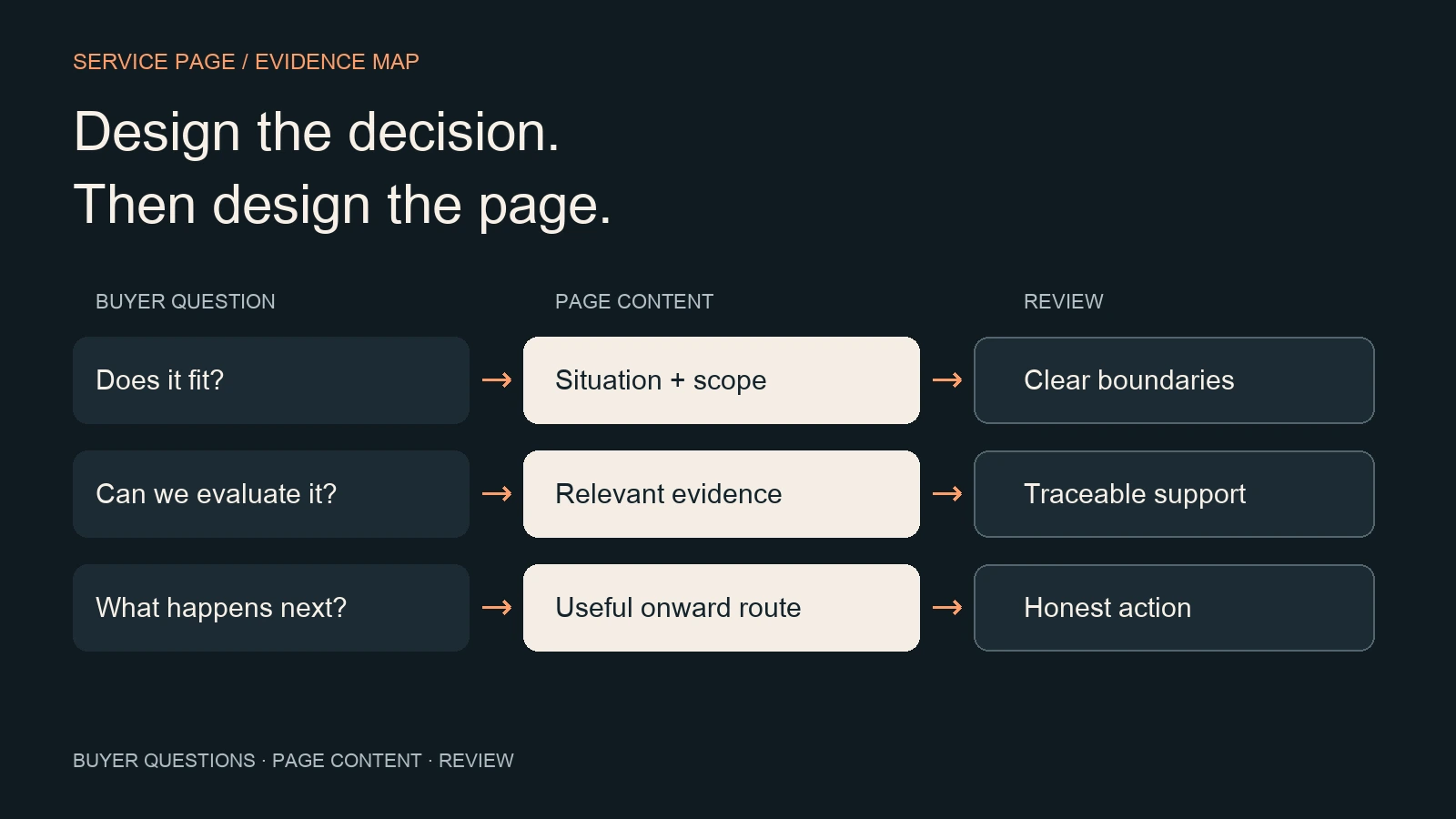
Keep essential scope and proof in readable page content. When a diagram explains a relationship, provide that relationship in adjacent text as well. The cover maps buyer questions to page content and review checks.
Offer a next step that matches the information available
A useful action tells the reader what they are starting and what information is needed. “Discuss this service” and “Read the requirements” serve different readiness levels. Choose wording that describes the real route, and do not imply an immediate assessment when the organization only accepts an initial message.
Supporting links can lead to an adjacent service, a documented method or a relevant resource. Google’s link guidance describes crawlable links as anchor elements with an href and recommends descriptive anchor text. Use that to make the handoff understandable; adding more links alone does not make a service explanation more complete.
If the next step uses a form, explain its fields and required inputs. W3C’s form-instruction guidance recommends instructions that help users understand how to complete a form. Keep the detailed submission, routing and qualification checks with the existing landing-page checklist rather than treating a successful button click as the final business result.
Use a service-page evidence worksheet
Copy the following worksheet into the page brief. Complete it for one real service before ordering sections or choosing visual treatments. A blank evidence cell is a decision to resolve, not permission to fill the space with a general claim.
| Decision | Draft answer / material | Release question |
|---|---|---|
| Fit | Audience situation, problem and relevant exclusions | Can a reader explain who this is for? |
| Scope | Outputs and what they support | Can the buyer distinguish activity from deliverable? |
| Participation | Inputs, dependencies and decisions | Are material prerequisites visible? |
| Evidence | Statement, source, publication permission and owner | Does the material support this particular statement? |
| Page structure | Heading outline and content wireframe | Can the page be understood without its visual styling? |
| Next step | Action, destination and information needed | Does the destination do what the link describes? |
| Maintenance | Owner and evidence-review trigger | Who changes the page when the service changes? |
For example, the hypothetical equipment-assessment page might list an inspection summary as an output, an asset inventory as an input, and a sample report with fictional data clearly marked as an illustration. The next step might ask the buyer to describe the asset category. The team still has to verify that these details match its actual service before using them publicly.
Review the rendered page as a buyer would
Review the actual page with its real copy, images and destinations. Check a direct entry to the page, not only a journey from the homepage. Ask a likely reader to explain the service, its boundary, the strongest supporting evidence and the next action. Record what that person understood and which questions remain unanswered.
- Verify that the title, H1 and opening describe the same service and audience.
- Check that headings, evidence captions and link labels remain meaningful on their own.
- At a narrow viewport, open the menu, read the scope content, inspect the image and follow the next step. Check any horizontal table scrolling within its container.
- Verify the stored SEO fields against the public title, description and canonical, then inspect author information, structured data, media and discovery links.
- Record unresolved questions and their owners. Recheck after a material service, source or page-template change.
Use the buyer-path accessibility checklist for deeper interaction checks. Focus the review on whether a buyer can understand the service, evaluate its evidence and choose a useful next step.
Frequently asked questions
What should a B2B service page include?
Include a clear fit statement, meaningful scope, buyer inputs, relevant evidence and a truthful next step. Explain the working relationship where it changes the decision. Treat this as a content plan to validate for the actual service, rather than a fixed number of sections or a universal layout.
Is a service page the same as a landing page?
A permanent service-detail page explains an offer within the broader website and supports direct entry as well as internal navigation. A campaign landing page is designed around a specific source promise and action. They may share components, but their content boundaries and onward routes should follow their different jobs.
Should every service get a separate page?
Create a separate detail page when there is a distinct offer and enough relevant content to answer its buyer questions. If pages would repeat the same scope and evidence with only a label changed, revisit the grouping before creating more URLs. A keyword variation alone is not a sufficient service definition.
How long should a service page be?
Use enough content to answer the decisions the page owns, and remove repetition that does not help the reader. Google’s people-first guidance does not prescribe a preferred word count. Judge completeness through the buyer questions, the available evidence and the usability of the rendered page, rather than a length target.
Sources and next steps
Sources were checked on 17 October 2026. The linked GOV.UK, Google and W3C guidance informs the user-needs, content, heading, link and form checks in this worksheet.
Start with one service and complete its evidence worksheet before moving sections around. Continue through the B2B Website Strategy cluster, or bring one service page and an unresolved buyer question to CHCZ.