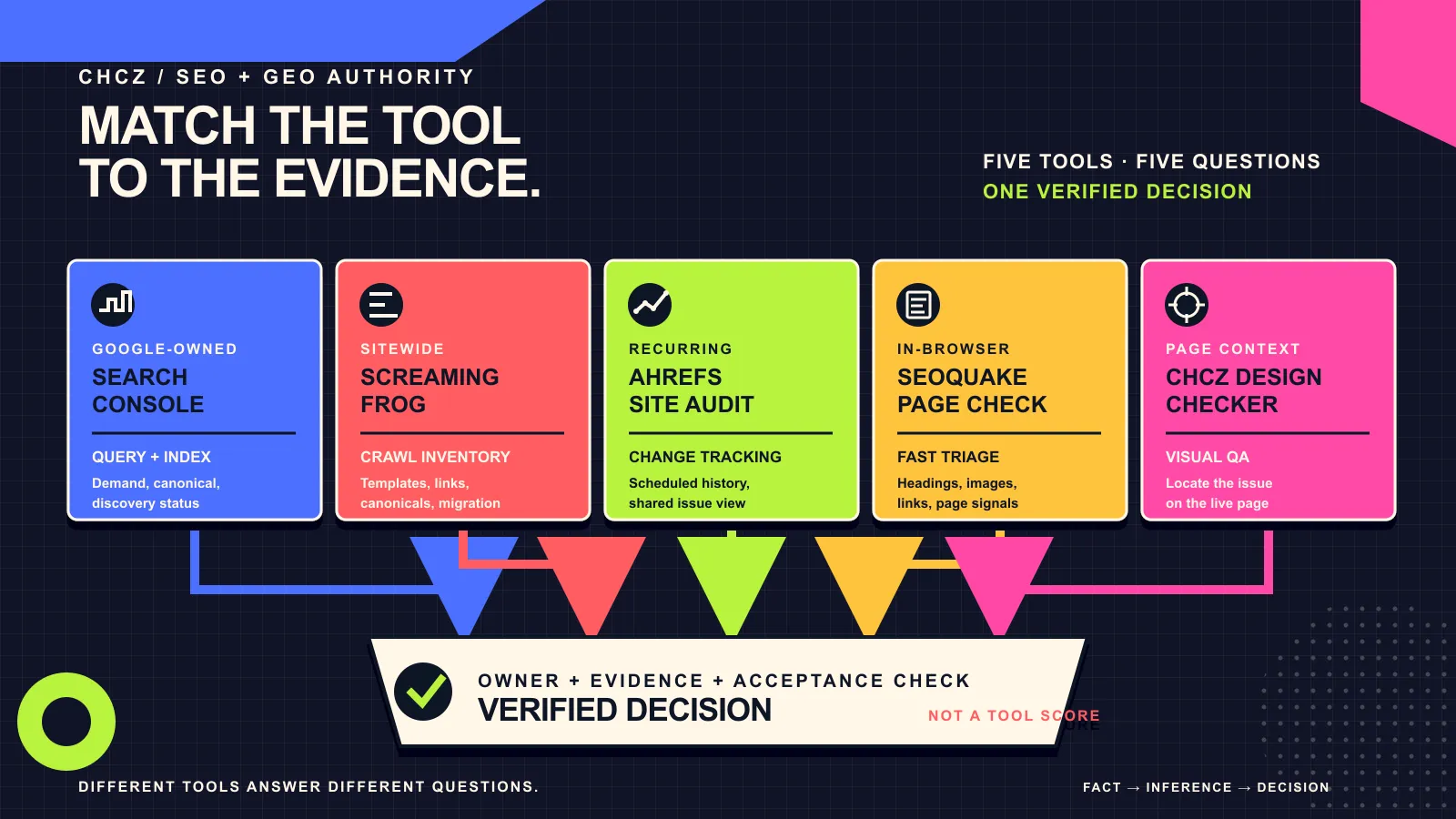
There is no single “best” SEO audit tool for every B2B website. A crawler can reveal patterns across thousands of URLs, Google Search Console can show what Google knows about a page, and a browser-based checker can make a visible page defect easier to locate. Those are different jobs.
The useful question is not “Which tool wins?” It is: Which evidence do we need to make the next decision? This guide compares five widely used options by audit task, evidence type, and limitation. The product facts are based on current first-party documentation checked on 7 August 2026. The task-fit recommendations are CHCZ editorial inferences, not vendor rankings.
The short answer: choose an audit stack, not a winner
| Tool | Evidence it is designed to provide | Useful B2B audit task | Do not treat it as |
|---|---|---|---|
| Google Search Console | Google Search performance and URL inspection evidence | Confirm query-to-page demand, canonical signals, discovery and index status | A complete crawler or conversion diagnostic |
| Screaming Frog SEO Spider | Sitewide crawl data from raw or rendered pages | Inventory templates, status codes, canonicals, headings, links and migration risks | Proof that Google indexed or valued a URL |
| Ahrefs Site Audit | Cloud-based crawl findings and change tracking | Monitor recurring technical issues and coordinate a distributed backlog | Google’s own index record |
| SEOquake | Browser-level page and link checks | Perform a fast current-page review during editorial or competitor research | A full website inventory |
| CHCZ Design Checker | Visual markers and page-level inspection | Locate visible heading, image, link, overflow and design-system issues on a live page | A replacement for crawling or Search Console |
For a small B2B site, a practical minimum is often Search Console plus a crawl and a page-level visual check. Larger or frequently changing sites may add scheduled cloud crawling and repeatable exports. The stack should expand only when it answers a decision the team actually owns.
Start with the buyer decision, not the issue count
Audit tools are very good at producing findings. They do not automatically know which finding blocks a qualified buyer, which page owns a search intent, whether a migration is imminent, or which team can implement a fix. A dashboard severity label is therefore an input, not the final priority.
Before opening a tool, write down four things:
- Buyer task: what a qualified visitor needs to understand, compare or verify.
- Canonical owner: the one URL that should answer that intent.
- Release risk: whether the audit supports routine maintenance, a redesign, a domain move or a platform migration.
- Verification rule: the observable condition that will prove the change was delivered correctly.
If the site is approaching a redesign, use the broader B2B website audit framework first. It connects content, conversion, accessibility, analytics and performance evidence before a team narrows the work to technical SEO.
1. Google Search Console: use it for Google-owned evidence
Verified fact: Google documents the Search Console Performance report as a way to examine clicks, impressions, queries and pages. Its URL Inspection tool reports what Google knows about a specific URL and can test a live URL against several requirements for appearing in Search. Google also cautions that an inspection verdict does not test every condition required to appear in results.
Editorial inference: Search Console should anchor an audit when the decision depends on actual Google demand, the canonical page credited with impressions, or Google’s recorded index state. It is especially valuable for preventing keyword cannibalization: filter a query, open the Pages dimension, and see which URL currently receives the signal before proposing a new page.
- Use Performance data to map queries to canonical owners and identify high-impression, low-click pages.
- Use URL Inspection to compare the indexed record with a live test after a fix.
- Record the date range and last-updated time; Search Console data is not a real-time log.
- Do not infer lead quality, page usability or complete crawl coverage from Search Console alone.
Official sources: Performance report tasks and use cases and URL Inspection guidance.
2. Screaming Frog SEO Spider: use it for a controlled site inventory
Verified fact: Screaming Frog describes SEO Spider as a website crawler that collects and exports onsite elements such as URLs, titles, meta descriptions and headings. Its current documentation says the free version crawls up to 500 URLs in one crawl, while advanced configuration, saved crawls, JavaScript rendering, custom extraction and integrations require a licence. The crawler can work from raw HTML or render pages with Chromium.
Editorial inference: this is the strongest fit in this comparison when the audit must inventory an entire site, inspect redirect and canonical patterns, or validate a migration list. It is also useful when the same defect may repeat across a template and a page-by-page check would hide the scale.
- Use a crawl to create the URL and template inventory before deciding what to fix.
- Choose raw HTML or JavaScript rendering deliberately; the two modes can reveal different evidence.
- Export affected URLs with their inlinks so an owner can reproduce and verify each issue.
- Do not translate “the crawler found it” into “Google indexed it” without Search Console or another Google-owned signal.
Official source: Screaming Frog SEO Spider product documentation.
3. Ahrefs Site Audit: use it for recurring cloud monitoring
Verified fact: Ahrefs documents Site Audit findings for canonicals, redirects, internal links, JavaScript, images, hreflang, indexability and sitemaps. Its help centre also documents crawl comparisons, report exports, custom issues and always-on auditing.
Editorial inference: Ahrefs is useful when a team wants a hosted crawl history and a repeatable issue view that can be revisited without passing local crawl files around. That makes it a reasonable coordination layer for ongoing maintenance. The right comparison is not “more issues equals better”; it is whether the scheduled evidence and ownership workflow justify another system.
- Use recurring crawls to spot regressions after releases.
- Configure crawl scope and issue rules so staging, parameters or intentionally excluded URLs do not distort the backlog.
- Compare crawl changes, not only the current health score.
- Confirm important findings in the rendered page, server response or Search Console before making a high-risk change.
Official source: Ahrefs Site Audit help centre.
4. SEOquake: use it for fast page-level triage
Verified fact: SEOquake’s official site describes a browser extension that performs a real-time page diagnosis, examines internal and external links, compares domains or URLs, and exports data. Its guide lists page checks for headings, images, text-to-HTML ratio, viewport configuration, robots.txt and XML sitemaps.
Editorial inference: SEOquake fits a quick editorial or research check when someone is already viewing a page and needs a compact summary. It is not the right owner for a complete inventory because the evidence is centred on the current page and browser context.
- Use it to catch a missing heading, image attribute or link pattern during a content review.
- Use exports when several reviewed pages need to be compared consistently.
- Treat third-party parameters as observations with their own definitions, not as Google ranking facts.
- Escalate repeated page defects to a site crawl to measure their true scope.
Official sources: SEOquake product page and SEOquake definitions.
5. CHCZ Design Checker: use it to connect a finding to the visible page
Verified fact: the current Chrome Web Store listing says CHCZ Design Checker checks headings, image alt text, broken links, oversized images and layout overflow. It also describes visual markers, navigation to flagged elements, font and colour inspection, and grayscale or blur simulation.
Editorial inference: the tool is most useful after a crawl or page audit identifies a problem but a designer, editor or developer still needs to see the affected element in context. It can shorten the path from a row in a report to a reproducible page observation. It should remain a complementary page-level check, not be presented as a Google crawler or a complete technical-audit platform.
- Use it to review the visible relationship between headings, images, links and layout.
- Use the flagged element as a reproduction step in a delivery ticket.
- Verify server responses, canonicals and index state with the appropriate crawl or Google-owned evidence.
- Review the current CHCZ Design Checker page before relying on a feature description, because browser extensions change over time.
Primary source: CHCZ Design Checker in the Chrome Web Store.
A five-step B2B SEO audit workflow
Step 1: define the canonical owner and buyer task
List the decision the page must support, the intended query family and the existing canonical URL. Check Search Console before creating a competing page.
Step 2: crawl the relevant scope
Crawl the whole site for a migration or template risk. Use a bounded list for a release, campaign or cluster review. Record render mode, crawl date and exclusions so the evidence can be repeated.
Step 3: validate important findings
Open the affected page, inspect the response and visible state, and use URL Inspection when the question concerns Google’s index. A finding becomes actionable only when the team can reproduce it and explain why it matters.
Step 4: assign the smallest correct fix
Identify the owner, dependency and acceptance check. Fix the shared template before its individual pages when the cause is systemic. Protect canonical URLs and redirects during redesign or migration work.
Step 5: rerun the same evidence path
Repeat the crawl or page check with the same scope. Confirm the live page, then monitor discovery, indexing, impressions and buyer response separately. A tool score improving is delivery evidence; it is not automatically commercial evidence.
How to choose without buying overlapping tools
Use this decision rule:
- Need Google query or index evidence? Start with Search Console.
- Need a complete, configurable inventory? Use a site crawler such as Screaming Frog.
- Need scheduled cloud history and shared issue tracking? Evaluate Ahrefs Site Audit.
- Need a fast check of the page currently open? Use SEOquake.
- Need to show where a visible defect sits? Use a visual checker such as CHCZ Design Checker.
Then ask what would be missing if that tool disappeared. If another part of the stack already provides the same evidence, the overlap may not be worth maintaining. If no tool connects the finding to an owner, buyer task and verification rule, the gap is operational rather than technical.
Frequently asked questions
What is the best SEO audit tool for a small B2B website?
There is no universal winner. Start with Search Console for Google-owned evidence, then add a bounded crawl and a visual page check. Choose additional software only when the site size, release cadence or collaboration model creates a specific evidence gap.
Can Google Search Console replace a site crawler?
No. Search Console reports Google Search and URL inspection evidence; a crawler systematically inventories pages and technical patterns within the scope you configure. The two sources answer different questions.
Should an audit tool’s severity determine priority?
Not by itself. Combine technical severity with buyer impact, canonical ownership, affected scope, dependencies, implementation risk and a clear verification rule.
How often should a B2B website be audited?
Match the cadence to change risk. Run focused acceptance checks after releases, recurring monitoring for frequently changing sites, and a broader evidence review before redesigns, migrations or major content consolidation. A calendar interval without a decision or owner usually produces noise.
Evidence note: Product capabilities were checked against first-party documentation on 7 August 2026. “Useful for” statements are editorial inferences based on the evidence each tool exposes. The workflow and selection rules are CHCZ editorial viewpoints. No customer outcome, commercial cost comparison, personal-use claim, or performance promise is asserted.
Explore the SEO / GEO Authority cluster and the GEO guide for the wider discovery and citation context. If you need help turning audit evidence into a scoped website decision, contact CHCZ.